Listen
to my calls
This tab is available to users subscribing to Inbound call recording with granted permissions to access
this function. This page enables the user to employ various search criteria to
locate inbound call(s) which have been recorded according to the settings
within Point my Number. Search results are presented to the user who can then
play/delete/download the recordings according to their defined user
permissions. Calls can be downloaded for local storage or stored online for a
maximum of six months after which time they will automatically deleted. Once
deleted, calls cannot be retrieved and storage is charged on a monthly basis
for peak monthly storage level which corresponds to a charging band as detailed
in the Inbound tariff.
The peak storage reading can be viewed for the current month and
historical months up to a maximum of six months.
Listen
to my calls Access Restrictions
|
Customer |
Customer must have subscribed to
the Call recording add on service. |
|
User |
Must have List to my calls enabled Must have Download calls enabled in
order to be able to download calls Must have Delete calls enable in
order to be able to delete calls |
Listen
to my calls description
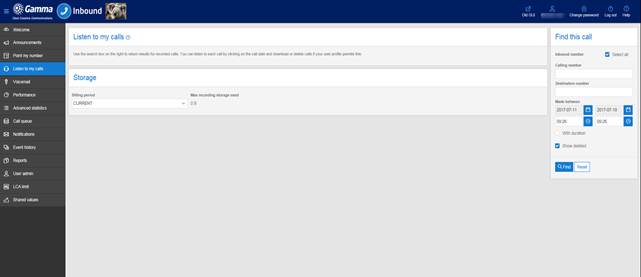
The listen to my calls tab allows you to listen to call
recordings made to your Inbound numbers.
Listen to
my calls
The Select all and Unselect all buttons are used in
conjunction with the Download and Delete buttons to identify the calls that you
wish to download or delete.
Calls can be sorted in ascending or descending order based
on any of the column headings. For example, to sort the calls in ascending
order based on the call duration simply click on the call duration title at the
top of the call list. Each subsequent click of the heading will toggle the
order between ascending and descending.
Find this call
On the right hand side under Find this call there are a
number of search options that can be used to find calls based on the telephone
number of the calling party, the duration of the call the final destination
number or the date the call was made.
When specifying date ranges you need to be aware that calls
are automatically deleted from the system after 6 months so call recordings
older than this cannot be retrieved.
The Show deleted check box allows you to view the details of
call recordings that have been deleted, though obviously the call cannot be
listened to if it has been deleted.
Storage
Towards the bottom left of the screen you can view the
details of your storage usage. The drop down box allows you to select a
previous billing period so you can see how your current usage compares.